City Bus Simulator Driving Game
Reviews
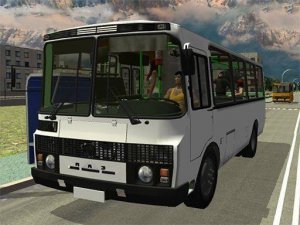
City Bus Simulator offers an authentic driving experience with responsive controls and a well-designed urban environment. The physics engine accurately simulates bus weight and handling, making each turn feel realistic. Multiple routes and unlockable buses provide good replay value. It is a calm yet engaging game suitable for short sessions or longer play.
Description
Game Introduction
City Bus Simulator Driving Game places you in the driver seat of a large bus traveling through a realistic urban environment. The game focuses on authentic vehicle handling and responsive controls, allowing players to experience the challenges of bus driving in a detailed city setting. Core objectives include navigating busy streets, executing tight turns, and managing challenging intersections. Each route presents new obstacles and traffic patterns that require careful attention and steady driving. The detailed city environment adds to the immersion, making every trip feel genuine. Designed for players who enjoy simulation experiences, this game offers a calm yet engaging driving challenge. It is suitable for both short play sessions and longer commutes, providing a satisfying sense of accomplishment as you complete each route.
How to Play
Players typically start by selecting a bus and a route from available options. Using on-screen controls or keyboard inputs, you accelerate, brake, and steer the vehicle through the city. Following traffic rules and avoiding collisions are essential to keep passengers safe. Navigating through intersections, narrow streets, and sharp corners requires precise handling. Each route must be completed within a time limit to earn points and progress. The game rewards smooth driving and careful maneuvering, encouraging players to practice and improve their performance over time.
Game Features
The game includes a realistic physics engine that simulates bus weight and handling. Smooth touch or keyboard controls allow for precise steering and speed management. Multiple challenging routes with varying difficulty levels provide variety and replayability. A detailed city environment features buildings and traffic that enhance the sense of realism. Several bus models are available to unlock and drive, each offering a different driving experience. These features combine to create an immersive simulation that appeals to fans of driving games.
Tips for Success
Focus on smooth acceleration and braking to maintain passenger comfort and avoid penalties. Study each route beforehand to anticipate sharp turns and busy intersections. Practice regularly to improve your control and timing, especially on more challenging routes. Pay attention to traffic signals and pedestrian crossings to ensure safe driving. Gradually unlock new buses and routes to keep the experience fresh and rewarding.
Compatibility
Faq
Can I play City Bus Simulator on mobile devices?
Are there different weather conditions in the game?
How do I unlock new bus models?
Is there a multiplayer mode in City Bus Simulator?
Can I customize the bus appearance or controls?
Does the game support external controllers like a steering wheel?
Other Similar Games

Baby Dolls: Surprise Eggs Discovery Kids Puzzle
A calm, ad-free puzzle game where toddlers tap eggs to discover cute baby dolls.

Golden Frontier City Builder
Wholesome simulation with friendly characters and smooth gameplay. Great for family game time.
Pizza Delivery Arcade Driving
Smooth driving and clear maps. Great for quick play sessions or unwinding.

Muddy Village Stunt Driving Game
Simple controls and varied cars make this a solid choice for quick driving fun.

Tractor Delivery Arcade Game
Simple physics driving with rewarding upgrades. Great for quick gaming sessions.
Vehicles Simulator 2 Driving Game
A relaxing driving simulator with six unique vehicles and realistic physics. Perfect for casual play.

Coach Driving Simulator - Bus Simulation Game
A relaxing and educational driving simulation that teaches safe driving through scenic routes.

Fennec Fox Click Adventure
Simple tapping with a charming cosmic story. Great for quick, relaxing play.