
Controls
About this game
Game Introduction
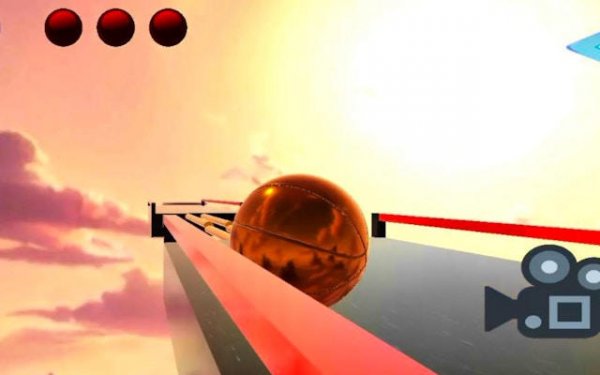
Basketball Hoop Runner Arcade is an arcade sports game that combines basketball shooting with runner-style obstacle navigation. In this game, you control a basketball as it moves through various courses filled with traps and barriers. The main objective is to guide the ball safely to the hoop at the end of each level and score a basket. The game blends quick reflexes with careful planning, offering a unique twist on traditional basketball games. It is designed for players who enjoy both sports and puzzle challenges. Each course presents a new layout that requires observation and timing to navigate successfully. The game may include different environments that change the look and feel of each level. This variety keeps the gameplay fresh and encourages players to adapt their strategies. The combination of movement and aiming creates a distinct experience that sets it apart from standard basketball titles. Players must learn to control the ball's path while avoiding hazards that could end their run. Success depends on balancing speed with precision, as rushing often leads to mistakes. The game rewards patience and practice, making it accessible to newcomers while offering depth for experienced players. Overall, it provides a engaging challenge for those who like sports games with a puzzle element.
How to Play
Players control the basketball using keyboard keys or touchscreen inputs. On a computer, typical controls involve using the WASD keys to move the ball and the mouse to look around the environment. Switching between different ball types may be possible using number keys. On mobile devices, the controls adapt to simple touch gestures. Before starting, you may select your device type to optimize the control setup. The game can be paused at any time, allowing you to plan your route through each level. Careful observation of the course is important to avoid traps and reach the hoop. The controls are designed to be responsive, so precise movements are possible once you get used to them. Learning how the ball reacts to different surfaces and obstacles is key to progressing. Each level may introduce new elements that require adjustments to your approach. Taking time to understand the layout before moving can help you avoid common pitfalls. The pause feature lets you study the course without pressure, which is useful for planning your path.
Game Features
This game includes multiple levels that gradually increase in difficulty. It offers several game modes to provide variety. The controls are designed to be simple and intuitive, working on both keyboard and touchscreen devices. Players may have the option to choose from different ball visuals. The game supports cross-platform play, so it can be enjoyed on desktop computers and mobile devices. Graphics quality settings may be adjustable to ensure smooth performance. A pause feature is available for convenience. The levels are structured to introduce new challenges as you advance, keeping the experience engaging. The combination of running and shooting elements creates a gameplay loop that is easy to pick up but hard to master. The game may include a scoring system that tracks your performance on each level. This encourages replayability as you try to improve your results. Overall, the features are focused on providing a smooth and enjoyable arcade experience.
Tips for Success
Take your time to observe each level before moving. Look for traps and plan your route to avoid obstacles. Practice controlling the ball smoothly, as precise movement is key to landing in the hoop. If you get stuck, try a different approach or watch for patterns in the level design. Regular practice will help you improve your reflexes and timing. Remember that patience often leads to better results than rushing. Staying calm and focused will help you navigate even the trickiest courses.
Compatibility
Screenshots
How To Play
Player Reviews
Basketball Hoop Runner Arcade offers a fresh take on sports games by combining precise ball control with obstacle navigation. The levels are well-designed, gradually increasing in challenge without becoming frustrating. The controls are responsive on both keyboard and touchscreen, making it easy to play anywhere. The variety of game modes adds replay value. Overall, it is a polished and enjoyable arcade experience.






Comments
Sign in to leave a review
Share your rating and tip other players.
No account? Create one
No comments yet.