
Controls
About this game
Core Assembly Mechanics
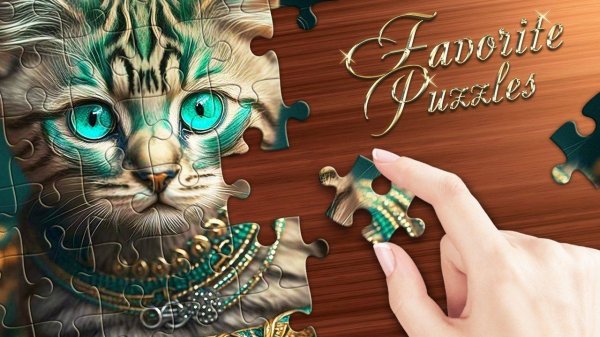
Players select an image from a built-in gallery or upload their own photograph. The game then breaks the picture into a grid of pieces, which are scattered on the board. The objective is to drag and drop each piece into its correct position to reconstruct the original image. A preview of the final picture is always available to guide placement. Some puzzles may allow rotating pieces for a more authentic challenge. The interface relies on simple touch or click interactions, making it accessible on various devices.
Customization and Difficulty
Before starting, players choose how many pieces the puzzle will have. Lower piece counts create a straightforward task suitable for younger players or quick sessions. Higher counts increase the complexity, demanding more patience and attention to detail. This sliding scale of difficulty means the same image can be approached differently each time. For those who enjoy tracking their progress, an optional timer can be enabled, though the default mode has no time constraints.
Personal Photo Puzzles
A standout option is the ability to turn personal photographs into playable puzzles. Users can select any picture from their device and let the game generate a custom puzzle from it. This feature adds a deeply personal element, allowing players to assemble memories of family trips, pets, or favorite landscapes. The quality of the final puzzle depends on the clarity and lighting of the original photo, so well-lit images produce the best results.
Visual Design and Atmosphere
The game presents a clean, uncluttered visual style. The puzzle board uses soft colors and a simple layout to avoid distractions. Background music, if present, is gentle and unobtrusive. The overall aesthetic aims to create a calm environment where the focus remains on the assembly process. Animations are smooth but minimal, ensuring the experience feels deliberate and unhurried.
Progress and Accessibility
The game automatically saves progress after each piece is placed. This means players can step away at any moment and return later to find their work exactly as they left it. The interface includes clear labels and large buttons, making it easy for users of all ages to navigate. Helpful tools like a grid overlay and hints are available but never required. The design prioritizes comfort, with no penalties for mistakes or slow progress.
Compatibility
Screenshots

How To Play
Player Reviews
This game excels at providing a low-stress puzzle experience. The ability to use personal photographs adds a unique emotional connection that many similar games lack. Difficulty scales smoothly from simple to complex, accommodating different skill levels. The clean visual design and automatic save feature make it easy to pick up and put down. It is a thoughtful choice for anyone seeking a quiet, mentally engaging activity without pressure or distractions.





Comments
Sign in to leave a review
Share your rating and tip other players.
No account? Create one
No comments yet.